Showing posts with label SLJ. Show all posts

Friday, 21 January 2022

SLJ " Who's bag"

Hola Blogger

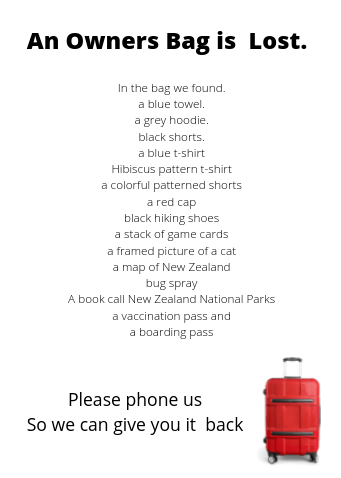
Yesterday one of our activity was call "Who's Bag is this.". For this I had to write a news report. To be honest I did really understand so I made a poster instead. My poster includes the thing that I found in the bag or the suitcase and an image of a suitcase. I was going to add the thing that were found but I couldn't find any images. So yeah. This is how my poster looks like.  


If you have any suggestions please write them in the comment. Thank you for reading my blog post. 

Friday, 7 January 2022

SLJ Summer Essential

 Hola Blogger

Today SLJ is Probably my favorite activity. This activity is called Summer Essential. First of all what those the word Essential mean. One of the meaning of Essential is necessary. Another is one of the meaning is VERY important. Now for this activity I had to make a "Summer Collage".  This is mine

I use a lot of picture that we Use, See, Go, Eat and Do in summer.

I think this was a really fun activity my favorite part is finding the images. Because there were a lot of cool ones but most of them are based / related to New Zealand. 

If you have any advice please write in the comments. By 

Monday, 3 January 2022

SLJ Make an Optical Illusion

Hola Blogger

Hope you had a happy new year. Today's blog post is about Optical Illusion. The first thing that I think you would what to know about is what is an Optical Illusion. Optical Illusion is to do eyes and light. It is usually an makes an Illusion is not real. For example cartoons are one of the types of Optical Illusion. It is a lot of drawing making the characters or something move. I learned this from Nano Girl. 

Here is the link: https://www.nanogirl.co/challenge4

Optical Illusion are usually to do with art somehow. This my one that I drew.  

I think it looks quiet cool. If you want to know read below.

For this you will need is coloring pencils and a piece of paper. Now how are we going to make this, it is very simple. you want to make curved lines like this image.

  But you don't need to have that many lines maybe just five and you don't need to have don'ts on the end then after you want to draw as many as you like. Also change colors and draw them  to overlap each other . My advice is to draw them big and small also not have the same colours next to each other.


If you have any advice please right them in the comments. Bye
Thursday, 16 December 2021

SLJ Vector Art

 Hi everyone.

Today is 3rd Day of SLJ. And today's activity is Vector Art. In computer art there are 2 types. One of them is Vector Art, which is the subject for today. Vector Art is a computer that is mainly used for sign. For example the Google signs. When you zoom up it will be very clear. The other one is Raster also known as Bitmap. Raster / Bitmap is made out of pixel or tiny square parts. When you zoom in you can see little squares to make the picture. From a far away distance it is very hard to tell that it is made out of pixel. Here is the link where I learned this. 

https://www.youtube.com/watch?v=1vUG2AbZTnI&t=17s

Have you learned anything from watching this video? I did, I learned a lot.

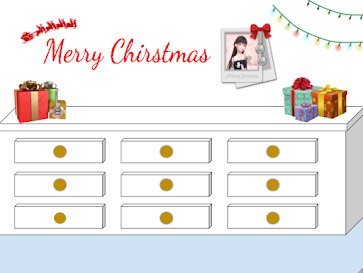
Now today I needed to make one for a decoration online for this I used Raster Images I know they were supposed to use Vector Image but I couldn't seem to find any, to make it look more like a Vector image I decided to use some shapes to replace some of the images and for the Raster images I made a tiny so it is hard to tell. Here is my work it a picture of a wall with some decorations on it.


What do you think? Please tell me in the commets

Wednesday, 15 December 2021

SLJ (2021 - 2022) Draw a geometry

 Hola Bloggers 

Today is the second day of this years SLJ. SLJ stands for Summer Learning Journey. So today's activity is       Draw a geometry. So I had a choice of doing the kick start or the step it up. I thought the kick start was a bit too easy so I choose to the Step it up. For this one I learned about triangle. Here is the video link.

https://youtu.be/yNH8GDyCMto

After that I had to choose to do it on paper or online. I chose online and for some reason I didn't know what pattern I should do so I so choose to do a picture of a bunny. Here is my pic.


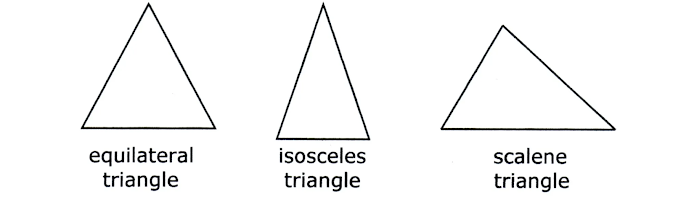
I know it's probably not what you expect but I really couldn't think of what to make. The types of triangles that I made was were Scalene, Isosceles and equilateral.

Scalene the sides are never equal and equilateral is the opposite. Isosceles always has 2 sides the same lengths.


If you have any advice for me please write it in the comments.


Monday, 25 January 2021

SLJ is fun

 Hi bloggers 

I had lots of fun on Summer learning journey ( SLJ ). It was lot of fun for me it help me with lots of thing that need to do in school. And you can get prizes in school. I'd love to do it next year. Please comment next time on summer learning journey.

Bye bloggers and blog you later 😀

Friday, 22 January 2021

Summer Learning Journey

  Kia ora bloggers 

Today on Summer Learning Journey There is this activity called Whana tent time.

I'm going tell you about this tent in a video:


Summer Learning Journey Week 6 Day 5


Thursday, 21 January 2021

Summer Learning Journey Week 6 Day 4

 Kia ora bloggers 

Today on Summer Learning Journey There is this activity called "That Was Summer" I watched a video or 2 and made a copy of Google slideshow, filled it with some words. Next time you need a copy of a Google drawing. Then wrote a poem and added a few pictures.

Here is a picture of the poem and picture:


😄 :

Please tell if there are any mistakes    Bye bloggers and blog you later  


Wednesday, 20 January 2021

Summer Learning Journey Week 6 Day 3

 Hola bloggers

Today on Summer Learning Journey the second activity is called "pixel art". I needed to watch 1 video and read the words in the video.Then I needed to make a copy of a slide show. after that I went to this app call Piskel and then I went to this app called pixelart.com

Here are the 1 of the pictures I made: 


Please tell if you have any advice ðŸ˜ƒ 

Bye bloggers and blog you later 😃


Summer Learning Journey Week 6 Day 3

 Aloha bloggers

Today on Summer Learning Journey the first activities called Mondrian. I needed to watch 2  videos.

Next I needed to make a copy of a Google sheet / template. In the template / Google sheet is instructions, title and boxes to create art.

Here is a link to my art :

https://docs.google.com/spreadsheets/d/1gLsZafoyOxYVtGApuq_c1JLOP-BtYrncVmyfyB46BrI/edit#gid=0

Please tell if there are any mistakes

Bye bloggers and Blog you later 😃

Tuesday, 19 January 2021

Summer Learning Journey Week 6 Day 2

Hola bloggers

Today on Summer Learning Journey activity is called " Soundtrack of summer" I needed to read or watch how to create a perfect summer song also Ineeded to read and watch something else. Which the video are the same but the reading parts. Next needed  to make up Google form.

Here is my google form:

https://docs.google.com/forms/d/1lU-f5lT1RKilzfEnTSrvvmdM6z4HkrxJYRrO4ebI2SM/prefill

Please tell if there any mistakes. 

Bye Blogger and  blog you later 😄

Monday, 18 January 2021

Summer Learning Journey Week 6 Day 1

 Hola blogger

Today on Summer Learning Journey , there's an activity called " build a super seesaw". The super seesaw is actually called a ''Catapult'' I watched the video that has instructions to make the super seesaw in Nano Girl's Lab.

Here is the link video :

https://nanogirlslab.com/pages/manaiakalani

I need a mini version here is a picture of it 


   I used plastic spoon and the ball wax wrap.

Bye bloggers and please tell if there any writing mistakes  😀

Friday, 15 January 2021

Summer Learning Journey Week 5 Day 5

 Hola bloggers 

Today on Summer Learning Journey there is this activity called " Do something New " .

I used Google Earth and made 15 locations in New Zealand. It was a lot of fun. I did a few places which I cities, some of my favourite places and different small Islands. 

Here is a link to my Google Earth:

https://earth.google.com/web/@0,0,0a,22251752.77375655d,35y,0h,0t,0r

and here is a link to Google Earth:

https://earth.google.com/web/

Please tell if there are any writing mistakes.

Bye bloggers and blogger you later 😀


Wednesday, 13 January 2021

Summer Learning Journey Week 5 day 3

 Sault Blogger 

Today the first activity for  Summer Learning  Journey is called "Summer Song Maker"

There is this app called Chrome music lab and we use the song maker app out all of the apps. I needed to to make music. the before I did that I listen to Tui songs and cicada songs. I also explore some different apps from Chrome music lab. Here is a video of my song that I made for song maker app:    


Please tell if there's any mistake and bye bloggers and blog you later. 😀


Tuesday, 12 January 2021

Summer Learning Journey Week 5 Day 2

Bonjour Bloggers

Today on Summer Learning Journey the activity was called "Summer Symmetry".

I needed to watch a video, read article and play a game. Then I need to take 4 photos with symmetry in them. Finally I needed to make a collage with the photos I took for my chromebook's camera. 

Here is a picture of my collage: 

 bye bloggers and blog you later.  😀


Monday, 11 January 2021

Summer Learning Journey Week 5 day 1

Hi Bloggers 

 Today for Summer Learning Journey first activity it is called "build an Anti Gravity Glass".

Here is a link of the instructions I did for the experiment: 

https://nanogirlslab.com/pages/manaiakalani

There are 2 experiments in the video. For the first experiment the water needed to stay to in the glass mine lasted for 15 seconds  but for the second experiment I didn't do because I couldn't find a plastic bottle so I didn't  do the experiment sadly.

Bye blogger and please tell if there are an writing mistakes.  ðŸ˜ƒ     

Friday, 8 January 2021

Summer Learning Journey 4 Day 5

Salut (  hello ) bloggers 

Today for Summer Learning Journey the first activity is called "Summer Collage" I needed to make a collage. I could take pictures using a camera or my Chromebook, and I could also use pictures online. I used pictures online because there are lots of rain outside and I didn't want to get my Chromebook wet and I didn't have a camera. I made a copy of a Google drawing. Then I search the web for some free images.

Here is a picture of my poster:  


Please tell if there any mistakes in this blog post

Bye bloggers is a blog you later     ðŸ˜€

Thursday, 7 January 2021

Summer Learning Journey Week 4 Day 4

 Aloha bloggers 

Today the second activity was called "special places". 

I needed to make a poster about a few of my favourite places. 

It was heaps of fun. Here is a picture of my poster I made :


      Please tell if you're any mistakes in the comments.

      Bye bloggers and blog you later     ðŸ˜„

Summer Learning Journey week 4 Day 4

 Kia ora bloggers 

Today one of the activities was called 'float your boat' I was doing the kicks start but instead of making one boat I made three boats. ideas are used to recycled paper to make the boats. Then I needed to test them out by floating them on the water. I've taken pictures of them. Then I made of poster ,which I didn't have to do.

Here is a picture of my poster


It might  look like the boats drown, but all of them floated.

Please tell if you have any advice in the comments.

Bye bloggers and blog you later. 😀